
Appearance
Concepts
Season Coverage
The CTG Pro Data Feed is based on the data in the "Hawk-Eye era", i.e. from the 2023-24 season and onward when pose data for all players first became available. We sometimes call this the "3D data" because it involves being able to analyze player movement in three dimensions, which was not previously possible in prior eras of tracking data.
Equivalent markings for the "2D era" (2013-14 through 2022-23) do not yet exist in the CTG Pro Data Feed.
During the alpha testing, only data from the 2025-26 season will be backfilled and updated with changes. When we move onto beta testing, the data will be backfilled for the entire 3D era.
Feed Types
The CTG Pro Data Feed provides two feed types: live and postgame.
The live data is built off of Hawk-Eye's delayed data stream, and the postgame data is built off of their processed stream. The delayed stream is available in-game with minimal delays, but is less accurate than the processed stream.
Checking Stream Availability
You can use the /game_status endpoint to check which games have data available for a given feed, as detailed in the Game Status Endpoint section.
Entity IDs
The CTG Pro Data Feed uses official NBA identifiers for games, players, and teams.
- Every game has a unique 10-digit NBA game ID that identifies the specific matchup, e.g.
0042400101or0022500241 - Each player has a unique integer identifier assigned by the NBA, e.g.
201939or1641705 - Each teams is identified by an integer IDs assigned by the NBA, e.g.
1610612747
CTG Internal IDs
CTG generates unique identifiers for most markings. This ID is designed to be easy to read and work with so that you can know at a glance what marking type it refers to, for example:
| Field Name | Format | Example |
|---|---|---|
shot_id_ctg | shot_<hash> | shot_53c414a581512a05b591899e94225dea |
pass_id_ctg | pass_<hash> | pass_9afbfea254c6d47a1f0f74e53ba3fab3 |
chance_id_ctg | chance_<hash> | chance_878aba9051e5f93a16c5b27c495e1c3d |
WARNING
These IDs are designed to be stable across changes in the data only if the underlying defining characterstics of the data do not change. That is, the shot ID is keyed to some identifying characteristics like the shooter and estimated release frame. If the release frame changes in the underlying data, the ID of the given shot will change.
You should not rely on these IDs to be stable across time, then. We do have an attempted solution to try to produce stable IDs which we may expose at some point, but until then you will need to engineer systems that assume these IDs could change across backfills.
Coordinate Systems
The CTG Pro Data Feed uses Hawk-Eye's coordinate system for all fields that reference specific x and y coordinates, in their unit of choice (inches).
Most fields will also reference the units in the field or field definition (e.g. inches vs. feet), but if not specified you can assume the defaults are inches for distance and degrees for angle measurements.
Court Layout
Here is the diagram of the coordinate system as taken from Hawk-Eye's documentation:
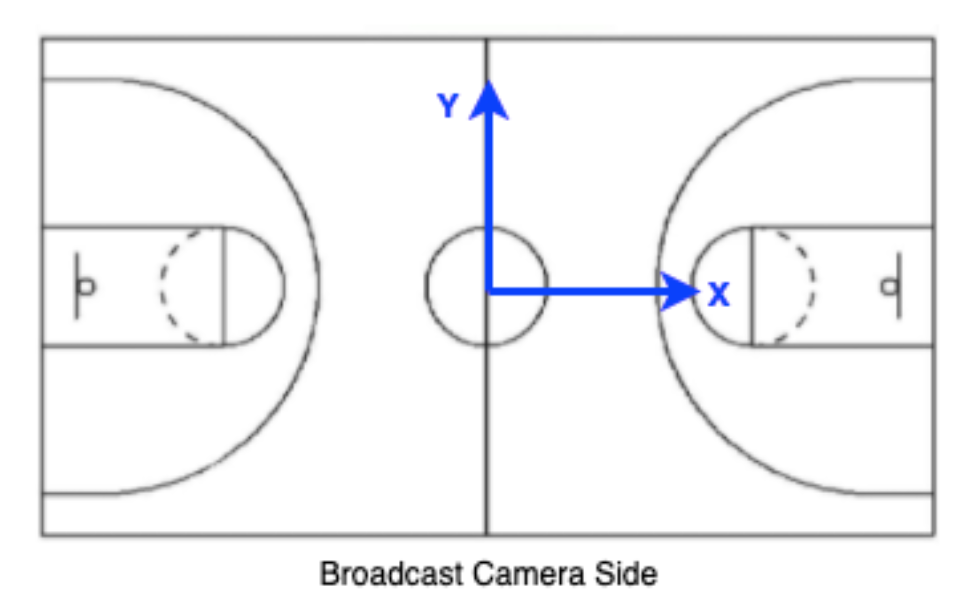
As you can see, the origin (0, 0, 0) is the center of the jump circle in the middle of the court right on the floor.
Attacking Direction
Where necessary, our data includes an attacking_positive_x flag (similar to what Hawk-Eye does) to indicate which basket the offensive team is attacking:
| Value | Meaning |
|---|---|
true | Offense is attacking the basket at X = +41.75 feet (right side of court when looking from broadcast angle) |
false | Offense is attacking the basket at X = -41.75 feet (left side of court when looking from broadcast angle) |
NOTE
We do not take the attacking_positive_x flag directly from Hawk-Eye's data, as we have found it is not always reliable. We calculate it ourselves, and thus there may be differences if compared directly to Hawk-Eye's version.
Court Regions
Sometimes our data includes a court region for easy grouping into standard regions:
| Region | Description |
|---|---|
ra | Restricted Area (near the rim) |
key | The paint/key area |
left corner two / right corner two | Corner 2-point zones |
left corner three / right corner three | Corner 3-point zones |
left wing two / right wing two | Wing 2-point zones |
left wing three / right wing three | Wing 3-point zones |
middle two / middle three | Top of key zones |
left dunker / right dunker | Dunker spots (offensive) |
far | Beyond the 3-point arc on offensive half |
backcourt | Defensive half of the court |
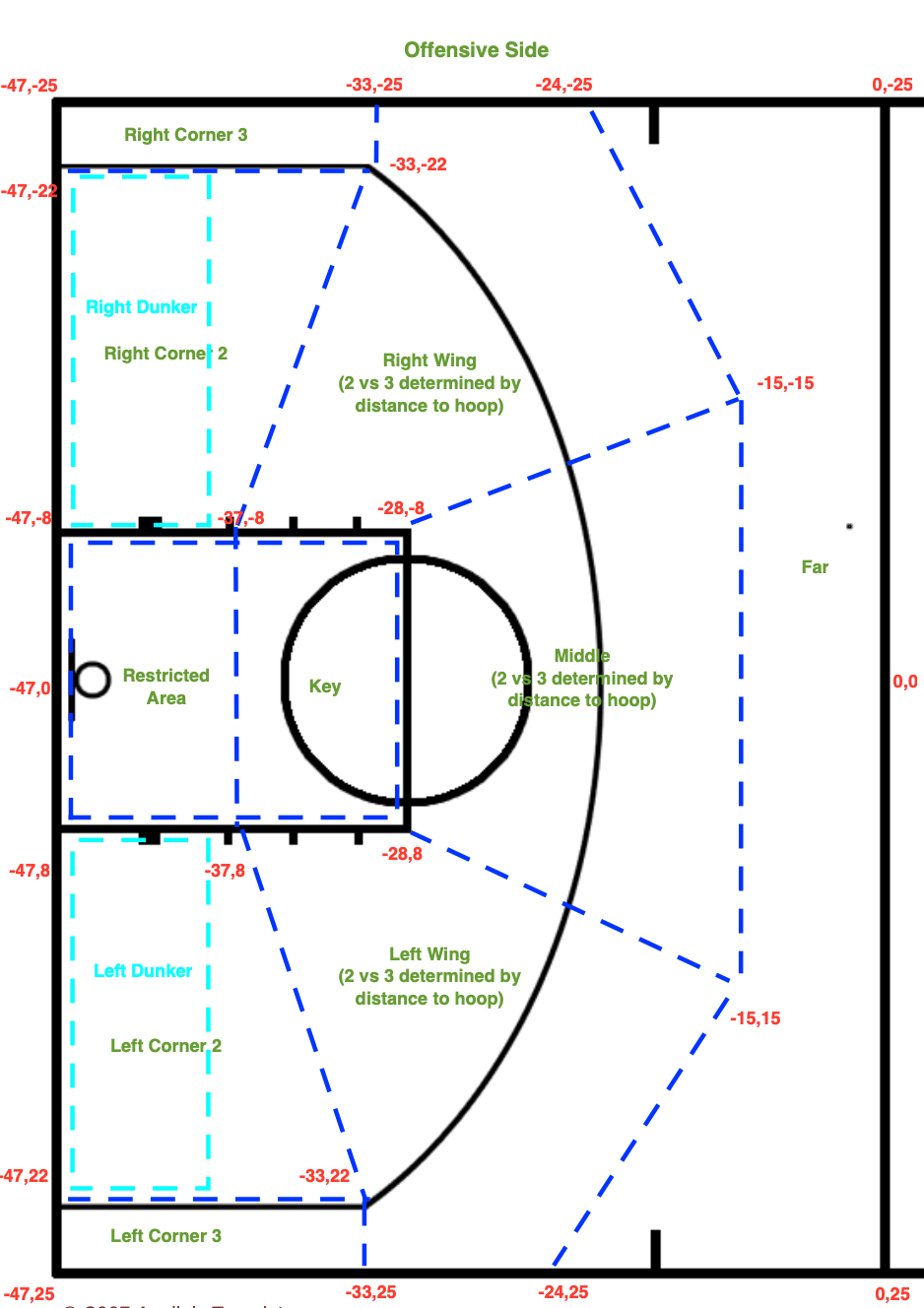
Here is a diagram showing our definitions of the various zones (coordinates in the diagram are in feet):
Frames & Timestamps
The CTG Pro Data Feed uses both the Hawk-Eye frame numbers and the wall clock timestamps to precisely identify moments during a game that apply to the markings.
Hawk-Eye Frame Numbers
Hawk-Eye frame numbers reference the frame number assigned by Hawk-Eye for the given feed type. Their tracking data is currently delivered at 60 frames per second (FPS).
Fields ending in _he_frame contain Hawk-Eye frame numbers, for example:
| Field | Description |
|---|---|
first_ball_in_hands_he_frame | When player first touches ball |
last_ball_in_hands_he_frame | When ball is released |
last_either_foot_on_floor_he_frame | Last frame where either foot is on the floor (right before becoming airborne) |
Wall Clock Timestamps
Recognizing that not everything can be tied to the Hawk-Eye data, and that many teams have not ingested frame level Hawk-Eye data, we also deliver the wall clock timestamp of the frame anywhere there is a frame number. They appear in fields that are named *_wall_clock. This allows you to tie marking data to specific points in time for other uses apart from matching to Hawk-Eye frame data.
Wall clocks are delivered in UTC using ISO 8601 format, for example:
2025-11-18T02:20:39.402+00:00